
If someone on your team started using an AI coding assistant this year, there is a decent chance a config file went into a repository with a real key typed inside it. Not a placeholder, not an example. A working credential for GitHub, Slack, Notion, your database, or an AI provider you pay for.
That is not a guess. A security company called Hush Security read about 82,000 of those config files from public GitHub repositories and published what it found in August 2026. I will skip the jargon and give you the parts that matter to a business with a handful of people and no security team.
What this config file actually is
When you use tools like Claude Code, Cursor, VS Code, Windsurf, Gemini CLI, Codex or JetBrains, they connect to other software: your calendar, your project tracker, your database, a design tool. The file that says which of those to connect to, and how to log in, is called an MCP config file.
Here is the part most owners never hear. Unlike a .env file, which developers are taught to keep out of version control, these config files are designed to be committed to the repository. That is how a team shares the same set of tools across everyone's machine. The design is convenient. It is also the reason secrets end up published.
What the researchers found
Hush Security's team searched public GitHub for the config filenames used by the major AI coding agents, parsed the files, and classified every slot meant to hold a credential. The short version of the report:
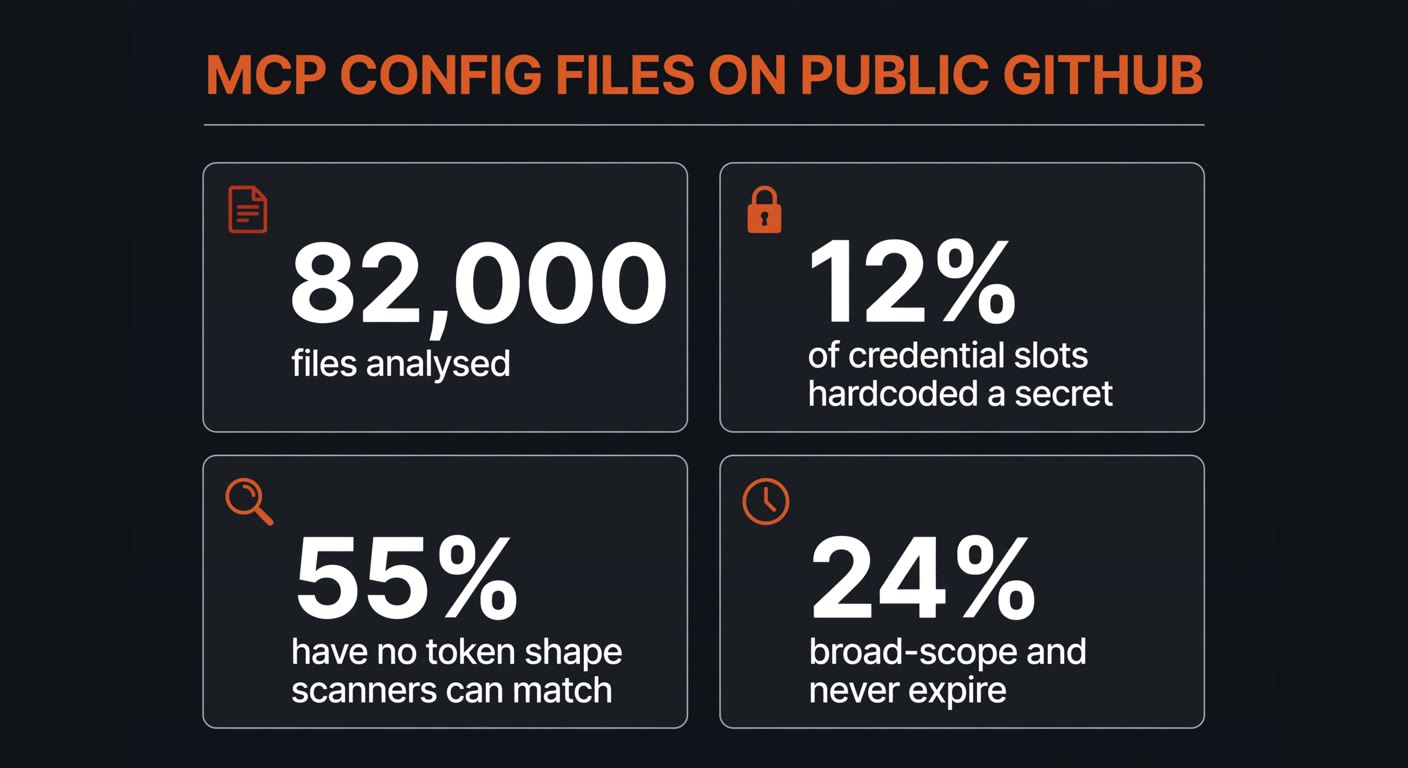
In plain terms: 44% of the credential slots used a safe pattern, like a reference to an environment variable or a secret manager. Another 38% held obvious placeholders such as your-api-key-here and never contained a real secret. The remaining 12%, roughly one slot in eight, held a working credential typed directly into a file built to be shared.
It gets worse in the details. Of the credentials found, 55% have no token shape that a scanner can recognise. Tools like gitleaks, trufflehog and GitHub's own secret scanning look for patterns: a ghp_ prefix, a connection string, a known key format. More than half of what is sitting in those repos matches no pattern at all, including opaque bearer tokens for internal servers that no provider signature describes. A scanner walks straight past them.
And the exposure is not narrow. Among the leaked credentials whose type has a defined scope, 53% grant access across the whole organisation, account, workspace or database. Among those with a defined expiry policy, 80% never expire on their own. Put together, 24% of all the hardcoded secrets are both wide-reaching and permanent.
The provider mix is the list you would least want to see in public: GitHub personal access tokens, Anthropic and OpenAI API keys, Slack and Notion workspace tokens, Postgres and Mongo connection strings with the password inside, and cloud keys.
Deleting the line does not undo the leak
This is the part that catches people. Someone notices the mistake, removes the line, commits the change, and considers it handled. It is not handled.
Hush traced the commit history of 7,681 config files that had once carried a credential, reading each one back through up to seven revisions. It found 1,394 files still carrying a secret at the current version, and 243 where the secret had been deleted from the latest file but remains fully readable in an earlier commit. The value is not hidden. Anyone who knows where to look can read it today.
That is why the fix is not a clean-up commit. It is a rotation: go to the provider that issued the key, revoke it, issue a new one, and put the new one somewhere that does not live in the repository at all.
The check to run this week
None of this takes a security team. It takes one person and about twenty minutes. Do it in this order.
- List your config files. Look for filenames like
mcp.json,.mcp.json,claude_desktop_config.json,opencode.json,settings.jsonandconfig.toml. They usually sit in a hidden folder in the user's home directory or in the project itself. - Read every value next to a word like KEY, TOKEN, SECRET or PASSWORD. You are looking for a long random string. If it reads
${GITHUB_TOKEN}or asks you to type it at runtime, that is correct and you can stop there. - Decide where each real credential lives. If it is in a file that is committed to a repository, treat it as published. If that repository is public, treat it as published on the internet.
- Rotate, do not delete. For every credential you find in that situation, go to the provider, revoke the old key, and issue a new one. This is the step people skip, and it is the only one that stops the bleeding.
- Replace it with a reference. The new credential goes into an environment variable or a password manager, and the config file points at it. Hush's own guidance is blunt about the order: never commit an inline secret, then move to short-lived tokens, then give every key an owner and an expiry date.
- Write down what you found. One line per credential: what it was, where it lived, when it was rotated. Next time someone asks, you will have the answer instead of a guess.
If your repository is public, you can also check it yourself before anyone else does. GitHub's secret scanning will already flag keys that match a known format, which covers roughly half of what the study found. The other half is invisible to it, so the manual read in step two is not optional.
What if nobody on your team writes code
Then you probably do not have these files, and you can close the tab. Plenty of small businesses bought a website, an automation or a chatbot from an agency or a freelancer in the last year, and that work may well live in a repository you have never looked at.
Three questions to send them, in writing:
- Do any of the AI tools you set up for us use a config file with a credential inside it? Is that file in a repository, and is the repository public?
- Has any credential ever been committed and then deleted? If yes, which ones, and were they rotated with the provider?
- Who owns each key, and when does it expire?
A decent supplier answers all three in a paragraph. An evasive answer is its own kind of answer, and worth knowing before the next invoice.
What to change going forward
The study's numbers describe habits, not bad luck. Three habits account for most of it.
| Habit to drop | What to do instead | Who it protects |
|---|---|---|
| Typing a key into a shared config file | Reference an environment variable or a secret manager | Anyone with read access to the repo, now and forever |
| Long-lived keys with no expiry | Short-lived tokens minted when the agent runs | The window between a leak and its discovery |
| Anonymous credentials nobody owns | One named owner and one expiry per key | The next person who has to revoke it in a hurry |
If you use AI agents inside a business system, the same logic shows up in a different place. We wrote about what happens when AI agents get API access, and the answer keeps coming back to the same two things: a credential should be narrow, and it should die on its own.
None of this means the tools are dangerous. It means the default is convenient, and convenience has a cost that lands six months later, in a repo nobody remembers pushing to.
Frequently asked questions
How would I know if a key of mine is already out there?
You would not, not by accident. Nobody notifies you. The realistic check is the one above: open the config files your AI tools use, read the credential slots, and compare them with the keys you have issued. If the same key appears in a repository, assume it is public and rotate it.
My repository is private. Am I safe?
Safer, not safe. A private repository still has every collaborator, contractor and former employee you ever invited, plus whatever tooling reads it. The study's files were public because code search could reach them; private ones were not counted, which does not mean they were clean.
The key was deleted months ago. Does it still need rotating?
Yes. Git keeps the old version of the file, and that old version stays readable to anyone with access to the repository. Deleting the line changes the current file and nothing else. Rotation is the only step that actually closes the exposure.
Is this only a problem for companies with developers?
No, it is a problem for whoever touches the tool. Marketing teams now run their own automation scripts, and owners install AI assistants on their laptops. The files are easy to create and easy to commit by accident. What is not easy is noticing afterwards.
Not sure what your AI tools can already reach?
BigLobster looks at how the software your business already pays for connects to everything else, finds the credentials sitting where they should not, and tells you which ones to rotate first. No jargon, just the list.
Ask us to review your setup